Translation bot for Discord and Twitch
Your server speaks every language.
MohCitrus posts a translation under every message in the channels you pick, a few seconds after it is sent, in 100+ languages.
On Twitch? Type !join in the chat at twitch.tv/mohcitrus.

Bear Hunt starts in 30 minutes. Please save your stamina and be ready to rally at 19:00 UTC
ZeeBear Hunt starts in 30 minutes. Please save your stamina and be ready to rally at 19:00 UTC
ESLa Cacería del Oso empieza en 30 minutos. Por favor, guardad vuestra energía y estad listos para la reunión a las 19:00 UTC.
- Servers
- -
- Members
- -
- Messages translated
- -
How it works
- 01
Invite MohCitrus to your server.
- 02
Choose channels and the languages your members use.
- 03
Members write normally. Translations appear under each message.
What MohCitrus does
Read the docsLanguage channels
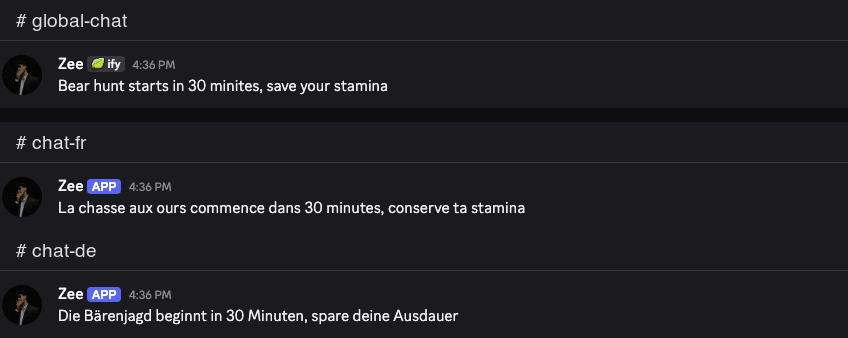
Link #global to #french, #german and #arabic, and each channel shows the conversation in its own language. You can also link two channels both ways.
- 02
Auto-translate channels
- Turn it on in a channel, pick the languages, and every message gets a translation posted under it. No commands. Free servers get 4 channels.
- 03
Screenshot translation
- Upload a battle report, event notice or in-game mail, or paste a link to it, and you get the text back translated. Only you see the result.
- 04
Live Translate
- Type /livetranslate invite in a voice channel and MohCitrus repeats each sentence in the other language, as voice, text or both. Server Pro only, one voice channel per server at a time.
- 05
Glossary
- Save alliance names, hero names and slang so they come through untranslated. Free servers can save 25 terms.
- 06
Peek Translate
- Right-click any message in any server, open Apps and choose Peek Translate to read it in your language. Only you see it, and Personal Pro switches it to Kiro.
- 07
Twitch chat
- Type !join in the chat at twitch.tv/mohcitrus, then !auto en,es,pt. Messages in your stream chat are translated into those languages. Free.
Also included: role languages, voice message translation, flag-reaction translation, chat summaries and pronunciation.
Pricing
Free plan available. Upgrade one server, or just yourself.
Free
- 30,000 monthly translation characters
- 4 auto-translate channels
- Peek Translate: right-click any message to read it in your language
- Kiro, our AI translation engine, translates your messages except at busy hours, when standard machine translation is used
Server Pro
Founding price until Oct 31, then $8.99. Locked in while you stay subscribed.
- No monthly character limit and no channel limit
- Kiro AI translates every message, at all hours
- Voice message translation
- Language channels and linked channels
Just for yourself? Personal Pro is $3.99 a month. Get Personal Pro
Questions about the Discord translation bot
It translates messages in the channels you pick, a few seconds after they're sent. You can also translate single messages, images and voice messages.